# Minstrel
A self-hosted music server that thinks for you. Smart shuffle, contextual likes, ListenBrainz-aware radio, and Lidarr automation — server-side, so every client (web, mobile, Subsonic third-party) gets the same intelligence.
> State and intelligence belong on the server, not the client.
 ## Highlights
- **OpenSubsonic-compatible.** Existing Subsonic clients (DSub, Symfonium, play:Sub, etc.) connect with no special configuration.
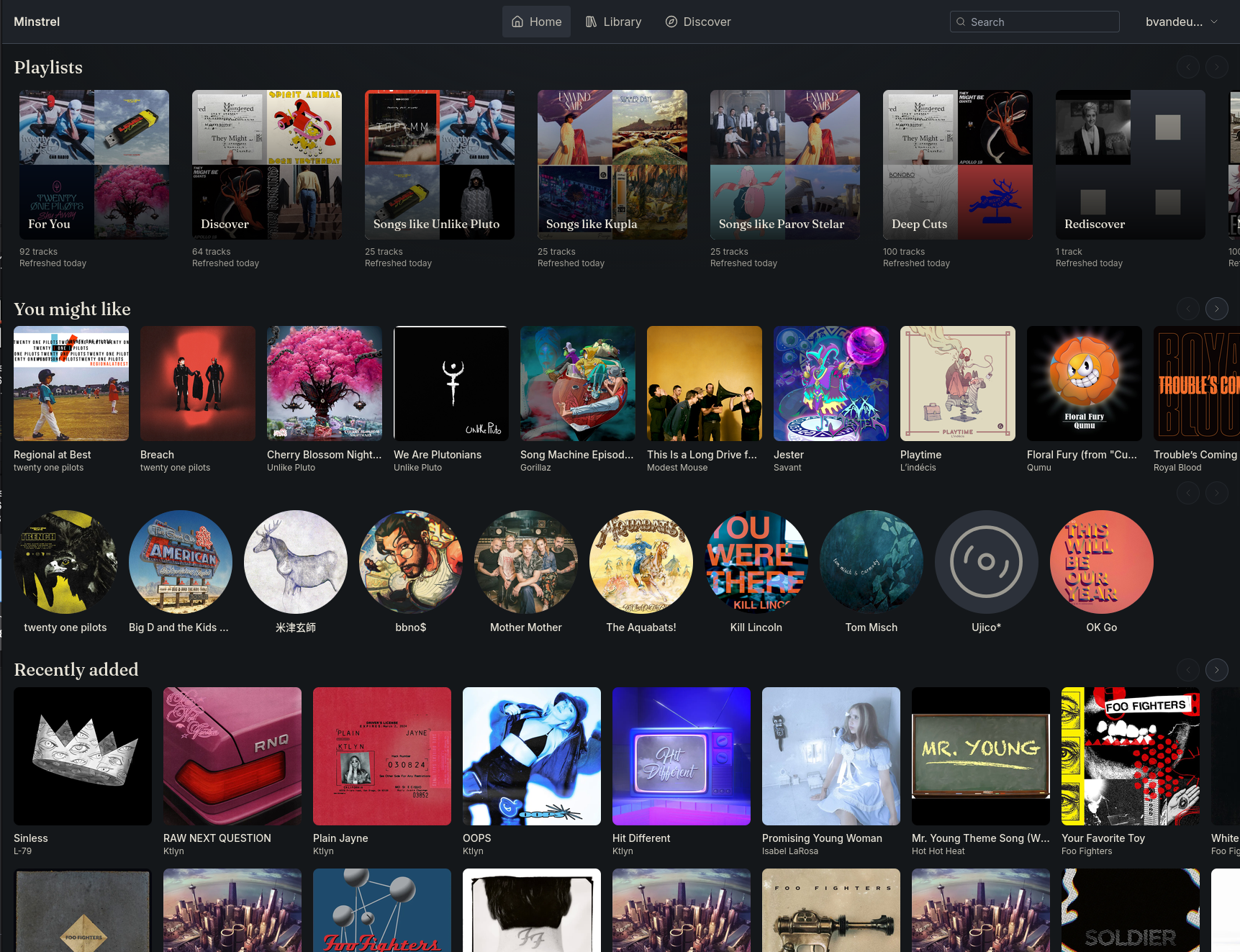
- **Server-side smart shuffle.** Track-similarity vectors, dual-like model (general + contextual), and session memory keep mixes coherent across devices.
- **ListenBrainz radio.** Session-aware "more like this" pulls from ListenBrainz similarity data, not a static genre tag.
- **Lidarr integration.** Triggered scans, request-driven album imports, and a quarantine flow when something doesn't fit.
- **Built-in web SPA.** Full-feature library, search, queue, playlists, and admin — no separate frontend container to deploy.
- **Native Android client, shipped with the server.** The signed APK is bundled into every image and attached to each [release](https://git.fabledsword.com/bvandeusen/minstrel/releases) — sideload it once, then the app self-updates straight from your own server (no app store, no separate download to track).
## Quickstart
```yaml
# compose.yaml
services:
minstrel:
image: git.fabledsword.com/bvandeusen/minstrel:latest
ports: ['4533:4533']
volumes:
# Your music library. Point ./music at wherever your audio files
# live. Mounted read-only — Minstrel never writes to your library.
- ./music:/music:ro
# Generated data: playlist cover collages, artist art, caches.
# The path must match MINSTREL_STORAGE_DATA_DIR, which the image
# sets to /app/data — keep this mount on /app/data or your cache
# won't survive a container recreate.
- minstrel-data:/app/data
environment:
MINSTREL_DATABASE_URL: postgres://minstrel:minstrel@db:5432/minstrel?sslmode=disable
# Colon-separated library roots to scan; must match the container
# path of the read-only music mount above (/music here).
MINSTREL_LIBRARY_SCAN_PATHS: /music
depends_on: [db]
db:
image: postgres:17
environment:
POSTGRES_USER: minstrel
POSTGRES_PASSWORD: minstrel
POSTGRES_DB: minstrel
# Postgres data dir — users, likes, play history, sessions, settings.
# The one volume you must never lose; back it up with pg_dump.
volumes: [pgdata:/var/lib/postgresql/data]
volumes:
minstrel-data:
pgdata:
```
```bash
docker compose up -d
```
## First run
With the stack up, a handful of in-app steps get you to a working library. Use your own host in place of `localhost` if you're reaching the server over a LAN/VPN address (plain `http://` is fine — no TLS required).
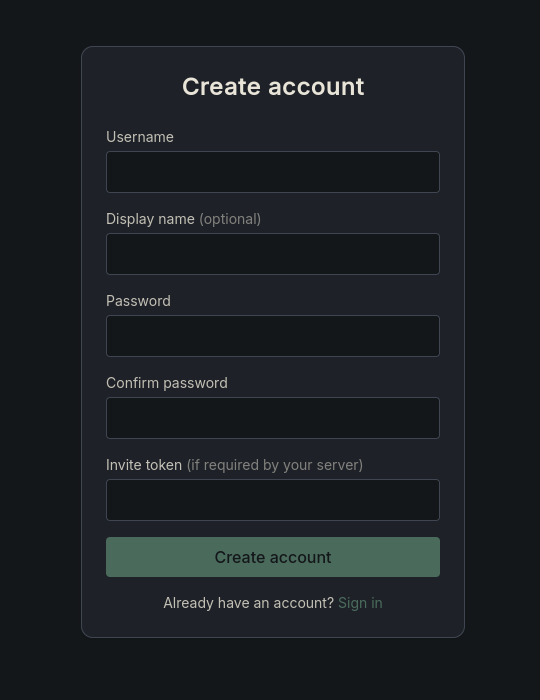
**1. Create your admin account.** Visit `http://localhost:4533/register`. The first account on a fresh instance is automatically the administrator; later users join through the same form or an invite token (step 5).
## Highlights
- **OpenSubsonic-compatible.** Existing Subsonic clients (DSub, Symfonium, play:Sub, etc.) connect with no special configuration.
- **Server-side smart shuffle.** Track-similarity vectors, dual-like model (general + contextual), and session memory keep mixes coherent across devices.
- **ListenBrainz radio.** Session-aware "more like this" pulls from ListenBrainz similarity data, not a static genre tag.
- **Lidarr integration.** Triggered scans, request-driven album imports, and a quarantine flow when something doesn't fit.
- **Built-in web SPA.** Full-feature library, search, queue, playlists, and admin — no separate frontend container to deploy.
- **Native Android client, shipped with the server.** The signed APK is bundled into every image and attached to each [release](https://git.fabledsword.com/bvandeusen/minstrel/releases) — sideload it once, then the app self-updates straight from your own server (no app store, no separate download to track).
## Quickstart
```yaml
# compose.yaml
services:
minstrel:
image: git.fabledsword.com/bvandeusen/minstrel:latest
ports: ['4533:4533']
volumes:
# Your music library. Point ./music at wherever your audio files
# live. Mounted read-only — Minstrel never writes to your library.
- ./music:/music:ro
# Generated data: playlist cover collages, artist art, caches.
# The path must match MINSTREL_STORAGE_DATA_DIR, which the image
# sets to /app/data — keep this mount on /app/data or your cache
# won't survive a container recreate.
- minstrel-data:/app/data
environment:
MINSTREL_DATABASE_URL: postgres://minstrel:minstrel@db:5432/minstrel?sslmode=disable
# Colon-separated library roots to scan; must match the container
# path of the read-only music mount above (/music here).
MINSTREL_LIBRARY_SCAN_PATHS: /music
depends_on: [db]
db:
image: postgres:17
environment:
POSTGRES_USER: minstrel
POSTGRES_PASSWORD: minstrel
POSTGRES_DB: minstrel
# Postgres data dir — users, likes, play history, sessions, settings.
# The one volume you must never lose; back it up with pg_dump.
volumes: [pgdata:/var/lib/postgresql/data]
volumes:
minstrel-data:
pgdata:
```
```bash
docker compose up -d
```
## First run
With the stack up, a handful of in-app steps get you to a working library. Use your own host in place of `localhost` if you're reaching the server over a LAN/VPN address (plain `http://` is fine — no TLS required).
**1. Create your admin account.** Visit `http://localhost:4533/register`. The first account on a fresh instance is automatically the administrator; later users join through the same form or an invite token (step 5).
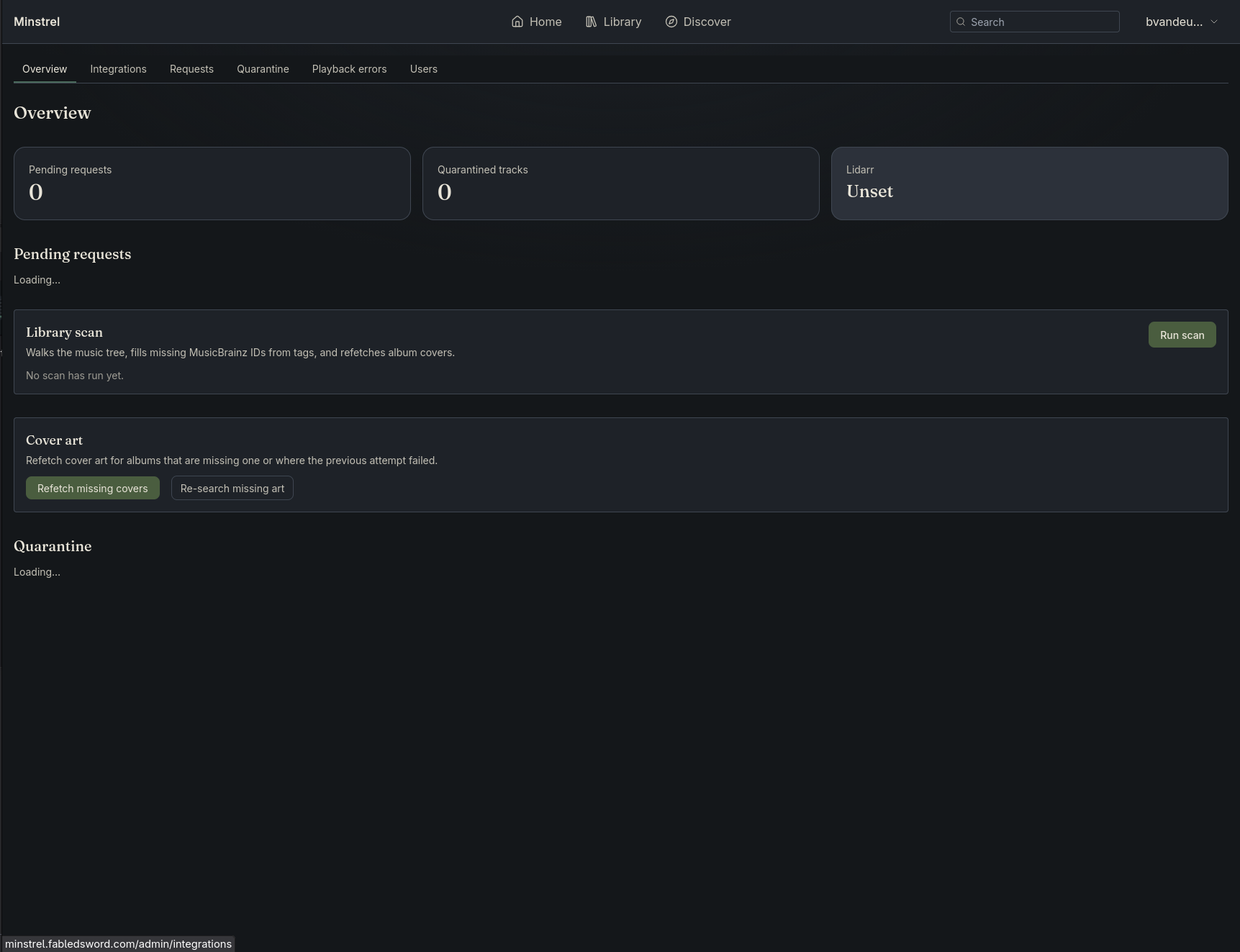
 **2. Let the first library scan finish.** `scan_on_startup` is on by default, so Minstrel walks your mounted library on boot and imports artists, albums, and tracks — no button to press. Watch progress (and re-scan any time) on the **Admin** page (`/admin`); the scan runs in stages and is incremental, so later restarts only pick up what changed.
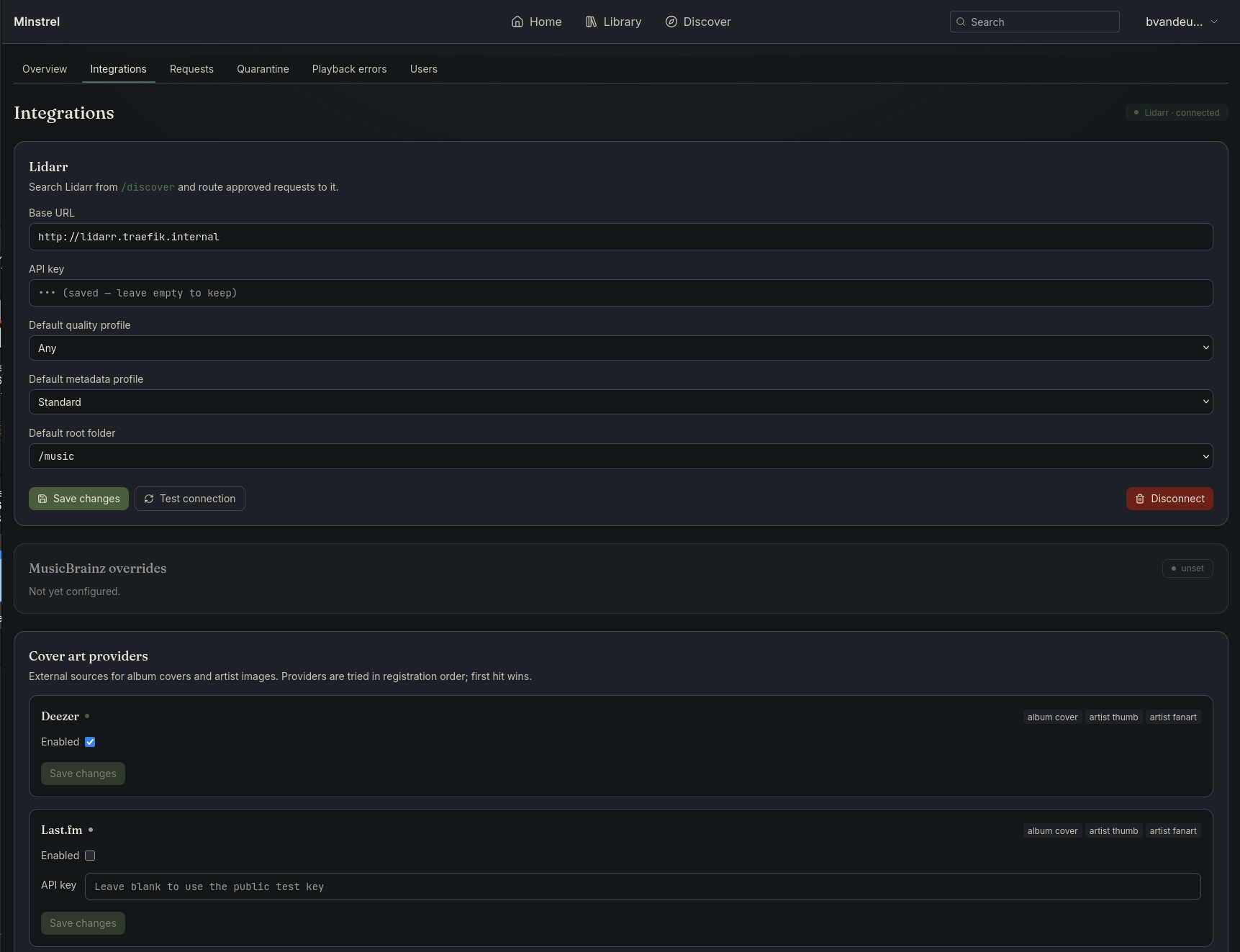
 **3. (Optional) Name the instance and wire up integrations.** In admin **Settings → Integrations** (`/admin/integrations`), add a ListenBrainz token (scrobbling + similarity radio) and/or a Lidarr URL + API key (the request flow). These live in the UI and apply without a restart; the display name can also be set via `MINSTREL_BRANDING_APP_NAME`.
 **4. Install the Android app.** Open **Settings** (`/settings`) and use the *Install the Android app* card to download the APK that ships inside this server image, then sign in with the same account. From then on the app self-updates straight from your server.
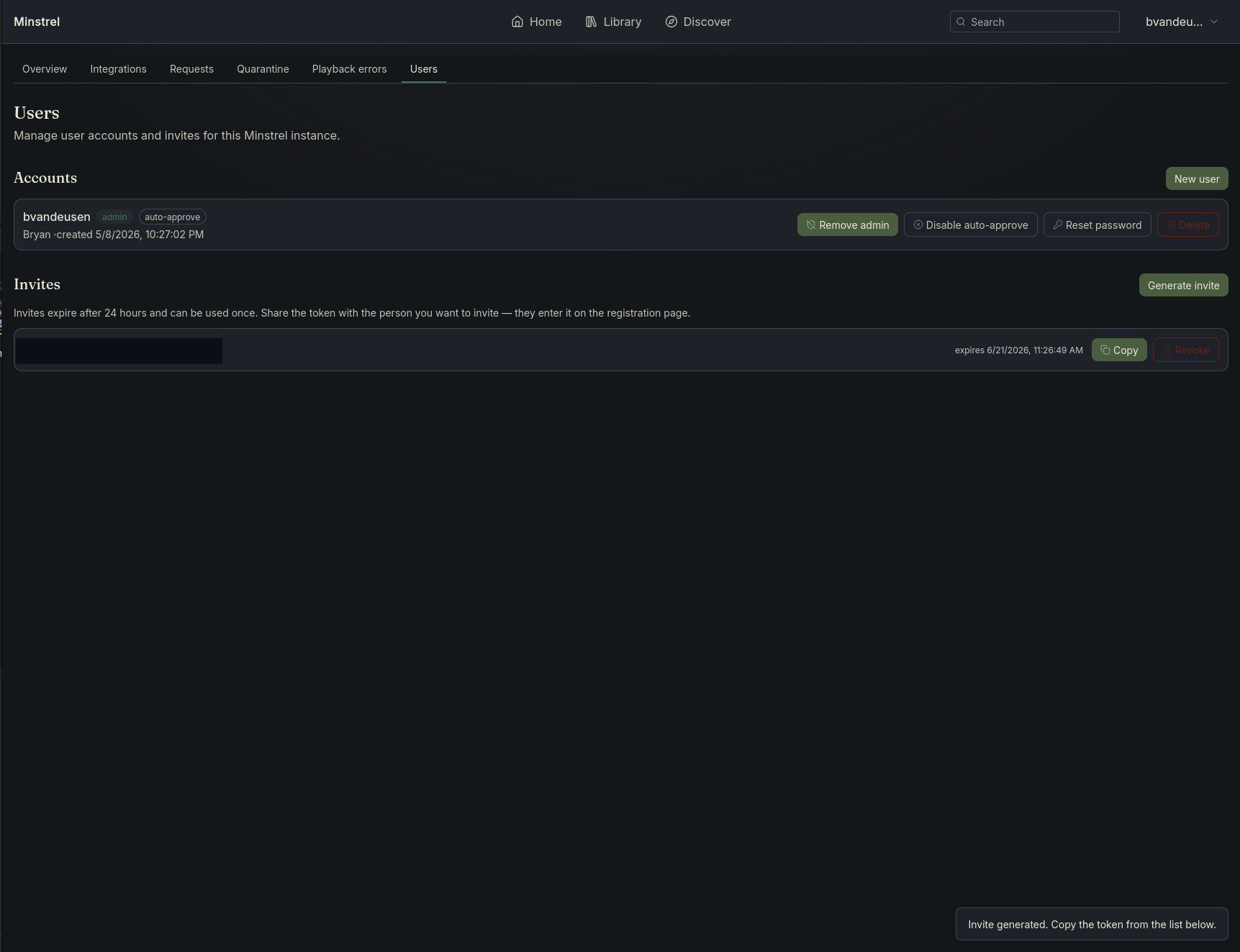
 **5. Invite the rest of the household.** From admin **Users** (`/admin/users`), generate an invite token (or enable open registration). Each person gets their own account, so likes, play history, and recommendations stay per-user.
 For the full configuration surface, see [`config.example.yaml`](./config.example.yaml).
## Configuration
Most operators only need the env vars in the quickstart above. A few extras worth knowing:
- `MINSTREL_BRANDING_APP_NAME` — rename the instance ("Family Jukebox", "Office Music"). Surfaces in the header, browser tab, and OG share previews.
- `MINSTREL_STORAGE_DATA_DIR` — where generated artefacts (playlist cover collages, artist art, caches) are written. The container image sets this to `/app/data`, which is why the quickstart mounts the `minstrel-data` volume there.
- `MINSTREL_LIBRARY_SCAN_PATHS` — colon-separated list of music library roots to scan. Supports multiple roots (`/music:/podcasts`).
ListenBrainz integration (per-user scrobble + similarity tokens) and Lidarr integration (URL + API key) are configured through the admin Settings UI rather than env vars or yaml — per Minstrel's "config in UI" rule, integration settings live where operators can edit them without restarting.
Most operational keys have a `MINSTREL__` env override. Recommendation and events tuning are yaml-only. See [`config.example.yaml`](./config.example.yaml) for the authoritative surface.
## Updating
Image tags (`git.fabledsword.com/bvandeusen/minstrel:`):
- `:latest` — the newest blessed image. Moves on every `main` push **and** every release. Recommended for most operators.
- `:vYYYY.MM.DD` — immutable per-day release tags. Pin one of these for a deployment you don't want moving under you. (Per-day CalVer — no trailing patch digit; a same-day re-cut moves the tag forward.)
- `:main` — the rolling post-merge tip. Same image as `:latest` at push time; choose it if you want to track `main` explicitly rather than the release line.
Every `:latest` and every `:vYYYY.MM.DD` bundles the current signed Android APK, so the in-app update channel is always live. Database migrations run automatically at startup; rollbacks require restoring a Postgres dump.
## Specs
Authoritative scope lives under [`docs/`](./docs):
- [Server spec](./docs/smart-music-server-spec.md) — current implementation focus.
- [Client spec](./docs/smart-music-client-spec.md) — Flutter companion app.
## Development
Two concurrent dev processes:
1. **Backend:** `docker compose up` — Postgres + Minstrel on `:4533`.
2. **Frontend:** `cd web && npm install && npm run dev` — Vite dev server on `:5173` with HMR. The Vite server proxies `/api/*` and `/rest/*` to `:4533` so session cookies work.
### Testing
- Unit + race (no DB): `make test-short`.
- Full suite incl. integration tests: `make test-integration`. This runs
against a dedicated `minstrel_test` database so a test run never
truncates your dev `minstrel` data (admin user, library, likes). It
brings up the compose Postgres and creates the test DB if missing.
- CI runs both: a fast `go test -short -race` gate plus an integration
job with its own ephemeral Postgres (`.gitea/workflows/test-go.yml`).
### Production build
`docker build -t minstrel .` runs the SvelteKit build inside a `node` stage, copies the output into the `golang` stage, and `//go:embed`s it into the final binary. The container serves the SPA from `/` alongside the API surfaces; no separate static-file server is required.
### Branches
- Day-to-day work happens on `dev` (or feature branches merged into `dev`).
- `main` is **protected** — changes land via PR from `dev`.
- Releases are cut by tagging `v*` off `main`; the release workflow builds and pushes the container image to the Gitea registry.
Task and milestone tracking: Fable (`Minstrel` project, id 12).
## License
See [LICENSE](./LICENSE).
For the full configuration surface, see [`config.example.yaml`](./config.example.yaml).
## Configuration
Most operators only need the env vars in the quickstart above. A few extras worth knowing:
- `MINSTREL_BRANDING_APP_NAME` — rename the instance ("Family Jukebox", "Office Music"). Surfaces in the header, browser tab, and OG share previews.
- `MINSTREL_STORAGE_DATA_DIR` — where generated artefacts (playlist cover collages, artist art, caches) are written. The container image sets this to `/app/data`, which is why the quickstart mounts the `minstrel-data` volume there.
- `MINSTREL_LIBRARY_SCAN_PATHS` — colon-separated list of music library roots to scan. Supports multiple roots (`/music:/podcasts`).
ListenBrainz integration (per-user scrobble + similarity tokens) and Lidarr integration (URL + API key) are configured through the admin Settings UI rather than env vars or yaml — per Minstrel's "config in UI" rule, integration settings live where operators can edit them without restarting.
Most operational keys have a `MINSTREL__` env override. Recommendation and events tuning are yaml-only. See [`config.example.yaml`](./config.example.yaml) for the authoritative surface.
## Updating
Image tags (`git.fabledsword.com/bvandeusen/minstrel:`):
- `:latest` — the newest blessed image. Moves on every `main` push **and** every release. Recommended for most operators.
- `:vYYYY.MM.DD` — immutable per-day release tags. Pin one of these for a deployment you don't want moving under you. (Per-day CalVer — no trailing patch digit; a same-day re-cut moves the tag forward.)
- `:main` — the rolling post-merge tip. Same image as `:latest` at push time; choose it if you want to track `main` explicitly rather than the release line.
Every `:latest` and every `:vYYYY.MM.DD` bundles the current signed Android APK, so the in-app update channel is always live. Database migrations run automatically at startup; rollbacks require restoring a Postgres dump.
## Specs
Authoritative scope lives under [`docs/`](./docs):
- [Server spec](./docs/smart-music-server-spec.md) — current implementation focus.
- [Client spec](./docs/smart-music-client-spec.md) — Flutter companion app.
## Development
Two concurrent dev processes:
1. **Backend:** `docker compose up` — Postgres + Minstrel on `:4533`.
2. **Frontend:** `cd web && npm install && npm run dev` — Vite dev server on `:5173` with HMR. The Vite server proxies `/api/*` and `/rest/*` to `:4533` so session cookies work.
### Testing
- Unit + race (no DB): `make test-short`.
- Full suite incl. integration tests: `make test-integration`. This runs
against a dedicated `minstrel_test` database so a test run never
truncates your dev `minstrel` data (admin user, library, likes). It
brings up the compose Postgres and creates the test DB if missing.
- CI runs both: a fast `go test -short -race` gate plus an integration
job with its own ephemeral Postgres (`.gitea/workflows/test-go.yml`).
### Production build
`docker build -t minstrel .` runs the SvelteKit build inside a `node` stage, copies the output into the `golang` stage, and `//go:embed`s it into the final binary. The container serves the SPA from `/` alongside the API surfaces; no separate static-file server is required.
### Branches
- Day-to-day work happens on `dev` (or feature branches merged into `dev`).
- `main` is **protected** — changes land via PR from `dev`.
- Releases are cut by tagging `v*` off `main`; the release workflow builds and pushes the container image to the Gitea registry.
Task and milestone tracking: Fable (`Minstrel` project, id 12).
## License
See [LICENSE](./LICENSE).